
Super Street Fighter II EX
Enhanced version
Screenshots
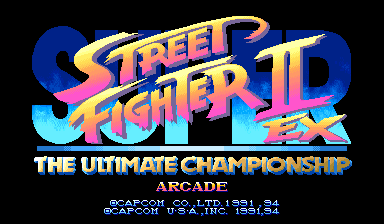
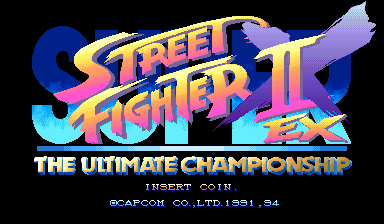
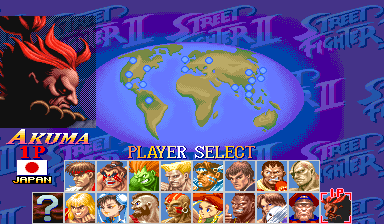
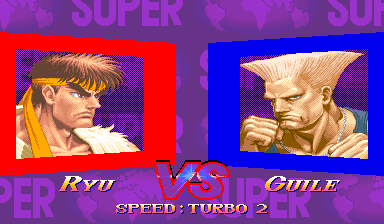
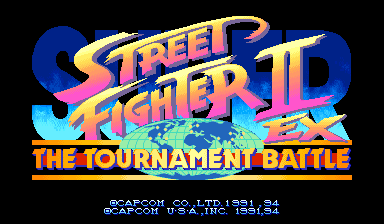
VS screen
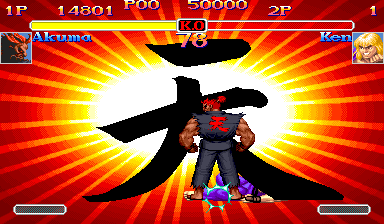
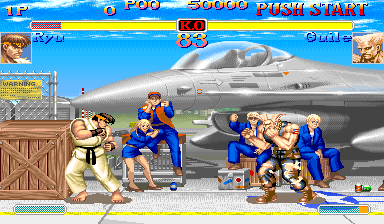
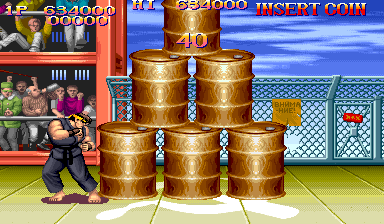
In the fight
About this patch
Super Turbo is the version competitive players swear by, but it left things behind. The bonus stages from Super Street Fighter II were gone. Shin Akuma was a hidden boss you had to earn, and Ten Akuma only turned up years later at home. Tournament Battle, the eight-player linked-cabinet mode, stayed with the earlier Super Street Fighter II.
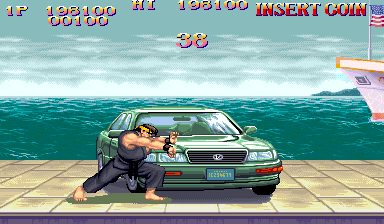
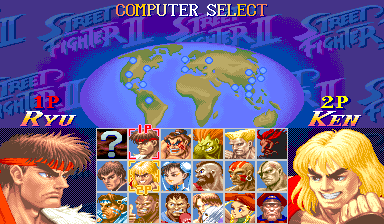
EX puts it together on the arcade game. Akuma has his own select-screen cell, with Shin and Ten available through codes there; the original Ryu codes still work. A random-select cell sits opposite him. The car, the falling barrels and the oil drums are back between fights. Link cabinets with the adapter and it runs Tournament Battle; without it, it plays as normal. Every fighter gets two more colors, Akuma and Shin Akuma get their colors from Ultra Street Fighter II, the move names are the modern ones, and the title screen carries an EX mark.
Nothing about the existing fighters changes: this is Japan's Super Turbo underneath. The USA build carries all of Grand Master Challenge's English text; the Japan build keeps the Japanese.
Console mode adds Arcade, Versus, Training and Options to the title screen. Versus has human or computer opponents, handicaps, stage selection and match results. Training has computer actions, guard, Super gauge settings and recovering health. Coin pauses play. MiSTer starts in Console mode; GAME MODE in EX CONFIGURATION switches to the arcade flow.
An EX CONFIGURATION page in the operator menu covers game mode, names, artwork and the bonus stages. The 30th Anniversary Collection's artwork is the default, and Ultra Street Fighter II's stage art is a third choice.
EX uses the same ROM files as the Japanese set. It runs in MAME and HBMAME and on MiSTer.
This is a release candidate.
What's changed
- Akuma and random-select cells on the player-select screen. On Akuma or Ryu, hold Start and press three kicks for Shin, or MP, HP, MK and HK together for Ten (hold Start and three punches gives Akuma)
- Ten Akuma has his Super gauge and the Raging Demon, with the 天 pose
- Akuma in eleven classic colors from Ultra Street Fighter II, picked on his own cell: three punches or three kicks, any single button, or LP+LK, MP+MK or HP+HK (LP+HK keeps the EX blue). His portraits follow the color, even in a mirror match
- Shin Akuma in eleven colors from Ultra Street Fighter II: pick Shin on Akuma's cell, let go of every button, then press one of the same buttons before the select screen moves on
- Akuma's own defeated face on the Continue screen, in the color you picked
- The three bonus stages from Super Street Fighter II, back in one-player games: the car after three fights, the barrels after six, the oil drums after nine. They run at the selected Turbo speed; BONUS STAGE in EX CONFIGURATION turns them on or off
- Console mode with Arcade, Versus, Training and Options on the title screen; GAME MODE in EX CONFIGURATION selects Console or Arcade
- Versus against another player or a computer, with handicaps, stage selection, win counts and match results
- Training with computer actions, guard and Super gauge settings, delayed health recovery, Restart and Change Character
- Option Mode for difficulty, time limit on or off, game speed (including NORMAL, slower than Turbo 1), round count and stereo or mono sound; Coin pauses play in Console mode
- EX CONFIGURATION in the operator menu: Console or Arcade mode; Japanese or international names; ORIGINAL, 30TH ANNIVERSARY or ULTRA SF2 artwork; BONUS STAGE on or off; and TIME LIMIT on or off. 30TH ANNIVERSARY, the default, uses the 30th Anniversary Collection's Hong Kong flag, Chun-Li's storefront signs and Guile's stage, with the red-winged runway emblem. Settings are saved between sessions. On EXIT, press 1P Start to save and return
- ULTRA SF2 artwork follows Ultra Street Fighter II's stages: its runway emblem and a gold can on Guile's stage, Chun-Li's storefront without its signs, a red sun on E. Honda's bathhouse mural and a plain floor on Zangief's stage, with China's flag and Russia's flag, RUSSIA caption and original-style Russia announcer call for Zangief's country
- Tournament Battle: with the link adapter, eight players and three matches across linked cabinets, with the Akuma and random-select cells on its select screen; without it, the game plays normally
- A new title screen with an EX mark
- Two more colors for every fighter: pick with two punches or two kicks, or hold Start as well for the Old version in those colors. The VS screen and the fight portrait show the color you picked
- Free Play in the Japanese build too
- Modern move names: Cammy's Spiral Arrow, Cannon Spike and Quick Spin Knuckle, and Dee Jay's Air Slasher, with the Japanese voice callouts in the USA build
- USA build: all of Grand Master Challenge's English. Japan build: the original Japanese text, with Grand Master Challenge's backdrop fixes
- The existing fighters play exactly as in Japan's Super Turbo
Compared with Super Turbo
How EX compares with Japan's Super Turbo and with Grand Master Challenge.
| Japan | Grand Master Challenge | EX | |
|---|---|---|---|
| Gameplay | Japanese version | Japanese version | Japanese version |
| Game modes | Arcade | Arcade | Arcade, Versus and Training |
| Pause | No | No | Coin in Console mode |
| Language | Japanese | English | English (USA build) or Japanese (Japan build) |
| Artwork | Original | Original | 30th Anniversary flag, signs and Guile stage by default, Ultra Street Fighter II stages, or Original |
| Shin Akuma | Hidden boss | Hidden boss | Playable from the start |
| Ten Akuma | No | No | Playable, with the Raging Demon |
| Bonus stages | No | No | Car, barrels, oil drums |
| Tournament Battle | No | No | Yes, with the link adapter |
| Colors per fighter | 8 | 8 | 10 |
| Free Play | No | Yes | Yes |
| Runs in stock MAME | Yes | Yes | Yes |
Downloads
You need your own dump of Super Street Fighter II X: Grand Master Challenge (Japan 940311) as the MAME
set ssf2xj.zip. Every build is made from that one set.
Each zip includes a readme.txt with full instructions.
The builds
| Build | --variant | MiSTer setname | HBMAME set | FBNeo set |
|---|---|---|---|---|
| USA (English) | usa | ssf2tuc | ssf2tuc | ssf2tuc |
| Japan (Japanese) | japan | ssf2xuc | ssf2xuc | ssf2xucj |
Build or update
Extract the kit, open a terminal in its folder, and run:
python3 apply.pyOn Windows, use py -3.13 apply.py. Choose Build or update,
then select your media folders and available outputs. Your media can stay where it is.
The kit remembers your choices and prepares required helpers and Python packages
privately on supported systems. Read INSTALL.txt in the completed output
for the files to copy. Run the same command again to update.
For MiSTer only, the separate MRA download can be used with your stock ROMs. The guided kit builds complete platform folders.
Advanced command-line reference
How to apply
unzip ssf2-ex-rc15-ips.zip -d ssf2xj-patch
cd ssf2xj-patch
python3 apply.py /path/to/ssf2xj.zip --out-dir out
The script checks every file against the checksums below, applies the patches,
checks the result, and writes the files for every platform in one go: (add --variant usa to make just one build)
USA (English):
  out/mame/usa/ssf2xj.zip
  out/hbmame/ssf2tuc.zip
  out/fbneo/ssf2tuc.zip
  out/mister/_Arcade/_Arcade Patches/_Enhanced Versions/Super Street Fighter II EX (USA).mra
  out/mister/games/hbmame/ssf2tuc.zip
Japan (Japanese):
  out/mame/japan/ssf2xj.zip
  out/hbmame/ssf2xuc.zip
  out/fbneo/ssf2xucj.zip
  out/mister/_Arcade/_Arcade Patches/_Enhanced Versions/_Japan/Super Street Fighter II EX (Japan).mra
  out/mister/games/hbmame/ssf2xuc.zip
MAME and original hardware. Put the zip from out/mame/ ahead of the
stock set in your MAME rompath (it keeps the name ssf2xj.zip, so use one build at a time), or burn its ROM
files. MAME's game menu won't start a set with patched ROMs, so start it from the command line:
mame ssf2xj. MAME shows checksum warnings for the patched ROMs. That's expected, and the
game runs normally. To start it from a menu, use the HBMAME build.
HBMAME. Put the zip from out/hbmame/ in HBMAME's
roms/ folder together with qsound.zip; it holds the complete set. It loads with no checksum
warnings. This edition's builds are official HBMAME sets, ssf2tuc and ssf2xuc (merged upstream), so full HBMAME collections may already carry them.
FBNeo. The kit produces the sets ssf2tuc, ssf2xucj.
Put the ZIPs from out/fbneo/ in your FBNeo ROM folder, keeping their ZIP and ROM filenames.
These contain the complete game ROMs. Use an FBNeo version with definitions matching this game release.
To build only the FBNeo sets, use --platform fbneo --out-dir out.
MiSTer. Copy the _Arcade folder from
out/mister/ to the root of your SD card, and keep the stock, unmodified romset at
games/mame/ssf2xj.zip (split MAME sets also need qsound.zip). You need
Jotego's jtcps2 core, which update_all installs. The MRA applies the edition in memory
as the game loads, so nothing on your card is modified, and each build keeps its own settings and saves under its own setname.
The MiSTer-only download holds the same MRAs, ready to copy.
out/mister/ also holds the HBMAME set in games/hbmame/.
The MRA above doesn't need it, but the CPS+ Arrange and HD Remix MRAs load it,
so if you use CPS+, copy the games folder from out/mister/ to your card as well.
Any IPS patcher. Apply each file in ips/<variant>/
(Flips, Lunar IPS, …) to the ROM file of the same name and re-zip the set yourself.
Changed ROMs
Shared by every build:
| File | Size | Original CRC32 | Patched CRC32 |
|---|---|---|---|
| sfx.02 | 128 KB | 0022633f | 0328f08c |
| sfx.11m | 2.0 MB | 9bdbd476 | e33ef750 |
| sfx.21m | 1.0 MB | e32854af | 607d1bfd |
| sfx.23m | 1.0 MB | 760f2927 | 84905f31 |
| sfx.25m | 1.0 MB | 1ee90208 | e88e200d |
| sfx.27m | 1.0 MB | f814400f | a2807877 |
| sfxj.05 | 512 KB | f4ff18f5 | 477b0a5e |
| sfxj.08 | 512 KB | 2de76f10 | f7587a54 |
sfx.01 (128 KB, original CRC32 b47b8835) differs per build:
| Build | Patched CRC32 |
|---|---|
| USA (English) | 567b38e8 |
| Japan (Japanese) | 2e6944e0 |
sfx.09 (512 KB, original CRC32 642fae3f) differs per build:
| Build | Patched CRC32 |
|---|---|
| USA (English) | acf110a7 |
| Japan (Japanese) | e06f41f4 |
sfx.13m (2.0 MB, original CRC32 cf94d275) differs per build:
| Build | Patched CRC32 |
|---|---|
| USA (English) | e4add659 |
| Japan (Japanese) | 5ee3c4c7 |
sfx.14m (1.0 MB, original CRC32 b7cc32e7) differs per build:
| Build | Patched CRC32 |
|---|---|
| USA (English) | 293d6324 |
| Japan (Japanese) | cbe4cb9f |
sfx.15m (2.0 MB, original CRC32 5eb703af) differs per build:
| Build | Patched CRC32 |
|---|---|
| USA (English) | 5a46784c |
| Japan (Japanese) | 802dbbda |
sfx.16m (1.0 MB, original CRC32 8376ad18) differs per build:
| Build | Patched CRC32 |
|---|---|
| USA (English) | dbbcfd23 |
| Japan (Japanese) | 39655598 |
sfx.17m (2.0 MB, original CRC32 ffa60e0f) differs per build:
| Build | Patched CRC32 |
|---|---|
| USA (English) | 17f46d66 |
| Japan (Japanese) | 5798916f |
sfx.18m (1.0 MB, original CRC32 f5b1b336) differs per build:
| Build | Patched CRC32 |
|---|---|
| USA (English) | d2306bd2 |
| Japan (Japanese) | 30e9c369 |
sfx.19m (2.0 MB, original CRC32 34e825c5) differs per build:
| Build | Patched CRC32 |
|---|---|
| USA (English) | 78b9e35d |
| Japan (Japanese) | 5ff4994b |
sfx.20m (1.0 MB, original CRC32 459d5c6b) differs per build:
| Build | Patched CRC32 |
|---|---|
| USA (English) | 2380f43c |
| Japan (Japanese) | c1595c87 |
sfxj.03d (512 KB, original CRC32 50b52b37) differs per build:
| Build | Patched CRC32 |
|---|---|
| USA (English) | d54cc193 |
| Japan (Japanese) | a2797f83 |
sfxj.04a (512 KB, original CRC32 af7767b4) differs per build:
| Build | Patched CRC32 |
|---|---|
| USA (English) | 559132c5 |
| Japan (Japanese) | 7cf6194b |
sfxj.06b (512 KB, original CRC32 413477c2) differs per build:
| Build | Patched CRC32 |
|---|---|
| USA (English) | f483b814 |
| Japan (Japanese) | eb206bc6 |
sfxj.07a (512 KB, original CRC32 a18b3d83) differs per build:
| Build | Patched CRC32 |
|---|---|
| USA (English) | c29228d0 |
| Japan (Japanese) | a9301465 |
Darksoft CPS-2
The kit can build Darksoft CPS-2 flash files. Build them with --platform darksoft --out-dir out, then copy the selected game folder from out/darksoft/games/ to the card's games/ folder. Keep its flash files, key and NAME together. Follow the kit readme for build choices.
Release history
rc15 (2026-11-18)
- Pressing LK or Coin to back out of the Versus player setup screen returns to the title instead of freezing the game.
- Ryu's attract intro no longer shows displaced graphics, and completed screen fades stay black during transitions.
- Ten Akuma's finishing glyph stays behind the fighters without hiding the burst effect.
- ULTRA SF2 artwork uses Russia's flag, the RUSSIA caption and its original-style Russia announcer call in both regional builds. ORIGINAL and 30TH ANNIVERSARY retain their own flags and USSR call.
- Chun-Li's English ending choices have consistent lettering and spacing. Japan's service menu is centered, its Option Mode shows PRESS START TO EXIT like the USA build, and its country flags follow the selected artwork throughout the game.
- Console mode skips the FBI notice; Arcade mode keeps its normal regional opening.
- Cleaned up the repeating spots in Blanka's clouds in both regional builds.
rc14 (2026-11-14)
- Ensures Darksoft compatibility on original CPS-2 hardware: corrects stage graphics and the USA build's character-selection portraits, cursors and pause-screen colors.
- Ryu's stage stays intact during Versus and Training, including jumps and the top edge of the picture. Pausing and resuming on Cammy's stage no longer briefly corrupts the background.
- Versus and Training respond to the first direction as character selection opens, and the opening portrait has the correct colors.
- The defeated fighter's pose is preserved at the start of Continue. Skipping Chun-Li's intro early no longer leaves its music playing over the title.
- Country flags and names follow the ARTWORK setting throughout character selection and VS screens. Stage selection now plays a sound when moving between stages.
rc13 (2026-11-03)
- TIME LIMIT in Option Mode and EX CONFIGURATION. With it off, the clock shows ∞ and rounds end only by KO.
- A NORMAL game speed, slower than Turbo 1, in Option Mode, Training and the operator menu.
- Two-player Versus has no countdown on the select screen.
- Versus and Training play the Arcade select theme, and the theme loops its main section instead of restarting.
- LP confirms on the Console title screen as well as Start.
- The first fighter preview shows the EX colors straight away, and the attract-mode previews follow the color setting.
- Player 1’s cursor appears in Training when SPEED SELECT is on.
- Start works again after leaving the operator menu.
- M. Bison’s defeated portrait in Versus uses his own colors.
- Flags no longer cover Fei Long’s and Zangief’s select portraits with the 30th Anniversary and Ultra artwork.
- Versus skips the arcade score tally after a KO.
- Fast music plays at low health in one-round matches.
- Background tiles no longer blink in on Blanka’s and Boxer’s stages.
rc12 (2026-10-30)
- Console mode with Arcade, Versus, Training and Options on the title screen; GAME MODE in EX CONFIGURATION selects Console or Arcade
- Versus against another player or a computer, with handicaps, stage selection, win counts and match results
- Training with computer actions, guard and Super gauge settings, delayed health recovery, Restart and Change Character
- Option Mode for difficulty, game speed, round count and stereo or mono sound; Coin pauses play in Console mode
- Background details are corrected on Ryu's, E. Honda's, Blanka's, Guile's, Ken's, Chun-Li's, Zangief's, Boxer's and Cammy's stages.
- Dee Jay's, Blanka's, M. Bison's and Akuma's portraits better match their fighter colors, including Dee Jay's necklace and Akuma's hair.
- Player-select grid portraits use selectable fighter colors. Honda, Blanka, Boxer, Claw and Dee Jay use their two-punch colors; Akuma keeps his classic three-punch color.
- Continue animations keep the selected portrait colors, including Blanka, Dee Jay, Zangief and the added colors.
- Akuma’s large portrait appears in its intended colors immediately when the player-select cursor lands on him.
- Ten Akuma’s Raging Demon accepts forward and LK remaining held while you complete the command. The two LP presses still need separate taps.
- The player-select heading no longer covers the selection cursor in Arcade mode.
rc9 (2026-10-21)
- Fight HUD portraits better match the selected fighter colors, and Zangief's large portraits keep consistent skin and beard colors.
- Stage edges are filled in on Vega's, Dee Jay's and Cammy's stages, and Fei Long's background stays covered during airborne hits.
- Moving between fighters on the select screen no longer briefly shows the next portrait in the previous fighter's colors.
rc8 (2026-10-15)
- Akuma, Shin Akuma and Ten Akuma keep their portraits after a win and when another player joins, including their extra colors.
- Fighter names are centered beside the VS emblem without running beneath it.
- Both regional builds have new checksums; rebuild them with the rc8 kit.
rc7 (2026-10-15)
- Cammy's stage no longer flashes gaps at the aurora boundary or beside the right-hand pillar, while retaining the floor's perspective and the game's timing.
- JAMAICA's final A now has a complete outline.
- ULTRA SF2 artwork shows RUSSIA for Zangief's country. ORIGINAL and 30TH ANNIVERSARY keep U.S.S.R.
- EX CONFIGURATION's EXIT shows the 1P Start prompt and uses 1P Start to save and return, like SYSTEM CONFIGURATION.
- Both regional builds have new checksums; rebuild them with the rc7 kit.
rc6 (2026-10-09)
- A third ARTWORK choice, ULTRA SF2, uses Ultra Street Fighter II's stage art: its runway emblem and a gold can on Guile's stage, Chun-Li's storefront without its signs, a red sun on E. Honda's bathhouse mural and a plain floor on Zangief's stage, with the 30th Anniversary Hong Kong flag.
- The 30th Anniversary art now shows Guile's runway emblem with red wings, as in the collection.
- Saved rc5 settings carry over.
- Both regional builds have new checksums; rebuild them with the rc6 kit.
rc5 (2026-10-06)
- A new EX CONFIGURATION page in the operator menu: Japanese or international names, original or 30th Anniversary Collection artwork for the Hong Kong flag, Chun-Li's storefront signs and Guile's stage, and the BONUS STAGE setting, which moves here. Choices are saved.
- The 30th Anniversary art is the default. Saved rc4 settings keep their BONUS STAGE choice.
- Player 2's Akuma HUD portrait now faces the opponent.
- Ten Akuma's fireballs, uppercuts and Tatsumakis now build Super meter.
- Shin and Ten Akuma's teleport no longer leaves them stuck in a pose.
- After an Akuma mirror match, the staff-roll gallery no longer shows Akuma in place of the other defeated fighters.
- Both regional builds have new checksums; rebuild them with the rc5 kit.
rc4 (2026-10-01)
- Shin and Ten Gouki/Akuma names now appear on the select, VS and fight screens. Ten also gains the additional Akuma-family color choices.
- The bonus stages run at the selected Turbo speed, and a new BONUS STAGE setting in the operator menu can turn them off.
- Akuma's country appears while previewing him. Win portraits and staff-roll portraits now reflect the correct Akuma result.
- Continuing as Akuma returns directly to his select cell and portrait without a brief Ryu flash.
- The NEXT FIGHTER question mark uses the stock art.
- Both regional builds have new checksums; rebuild them with the rc4 kit.
rc3 (2026-09-28)
- Akuma has eleven new colors, his classic colors from Ultra Street Fighter II, picked on his own cell: three punches or three kicks for the first two, a single button for the next six, and LP+LK, MP+MK or HP+HK for the last three. LP+HK keeps the EX blue. His portraits follow the color, even in a mirror match.
- Shin Akuma has eleven colors of his own from Ultra Street Fighter II. Pick Shin on Akuma's cell, let go of every button, then press one of the same buttons before the select screen moves on.
- Akuma's Continue screen shows his own defeated face, in the color you picked.
- Tournament Battle's select screen now has the Akuma and random-select cells.
- Both builds have new checksums, so rebuild them with the rc3 kit.
rc2 (2026-09-24)
- A new select-screen layout: Akuma has his own cell, with a random-select roulette opposite him and the grid re-centered. Shin and Ten are picked from Akuma's cell, and the original Ryu codes still work.
- Akuma, Shin and Ten have colored portraits on the select, VS, continue and NEXT FIGHTER screens and in the fight HUD, with separate colors for each player.
- Playable Akuma is named everywhere: Gouki in the Japan build and Akuma in the USA build, on the select and VS screens, in the fight HUD and in the bonus stages. A two-player bonus stage now names an Akuma winner.
- Ten Akuma's Raging Demon finish shows the 天 as in the Dreamcast version, with the Dreamcast hit timing.
- Fixed endings that could stall after the final fight: the win poses froze and endings such as Guile's family scene never started.
- Fixed the select-screen cursor and the alignment of the fighters' names on the select screen, and of Akuma's name in the fight HUD.
rc1 (2026-09-17)
- First public release candidate.
Related projects
- Super Street Fighter II Turbo: Grand Master Challenge, the English restoration EX's USA build is built on
- originalgrego's SSF2X Tournament Battle restoration, EX's Tournament Battle link code comes from this project
- Super Street Fighter II Turbo: New Legacy, Tyrone's Akuma portrait art in EX comes from this project
- CPS+, companion project: the Anniversary Edition and HD Remix soundtracks for EX on MiSTer, through its SSF2 EX MRAs
Notes
- Credits: Akuma's colored select, VS and fight-HUD portraits are Tyrone's art from Super Street Fighter II Turbo: New Legacy; the bonus stages are adapted from Capcom's Super Street Fighter II; the Tournament Battle link code comes from originalgrego's SSF2X Tournament Battle restoration; and Ten Akuma's move timing and finish come from the Dreamcast version.
- MAME reports checksum warnings for the patched files. That's expected; the game plays normally. HBMAME with the ssf2tuc or ssf2xuc set definition loads it without them.
- Fan work, unaffiliated with Capcom.