
Marvel Super Heroes vs. Street Fighter EX
Enhanced version
Screenshots
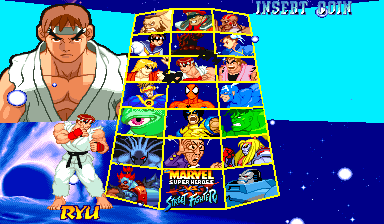
Cursor on Zangief
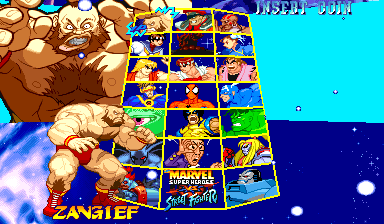
After a two-second Start hold
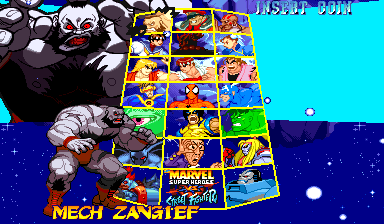
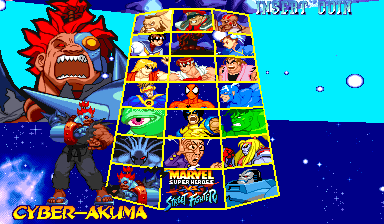
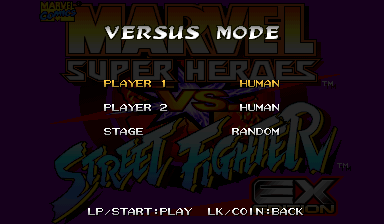
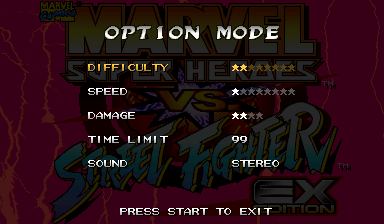
About this patch
Marvel Super Heroes vs. Street Fighter kept a lot from you. Outside Japan there was no Norimaro. Nowhere could you play as Cyber-Akuma or Apocalypse, or put the same fighter on a team twice. The console ports later added extra colors and more speeds, but only at home.
EX gives the arcade game all of it. Norimaro is on the select screen in both builds, with his own ending and restored nosebleed attack and victory animation. Hold Start on any fighter for two seconds and their hidden version appears, no codes needed, though the old codes still work. Any two fighters make a team. Cyber-Akuma and Apocalypse are playable too, each with a spot on the select screen. Every fighter gets the Saturn version's two extra colors, on the HP and HK buttons, and the service menu goes from three speeds to eight.
Console mode gives the game a home-style title menu: Arcade, Versus against a friend or the computer, Training, and Options with a time limit setting. The MiSTer MRAs start in Console mode; MAME and HBMAME start in Arcade mode, and GAME MODE in the service menu's EX page switches between them.
The other fighters retain their original moves, damage, hitboxes and computer behavior. The USA build also gets a new translation, straight from the Japanese: sixteen win quotes per fighter instead of eight, and every ending retold. It comes in two builds, USA and Japan, both with Free Play, and runs in MAME, HBMAME and on MiSTer.
This is a release candidate.
What's changed
- Norimaro in both builds, with his own ending, his restored nosebleed attack (back, down, down-back plus an attack button or Start) and his unused victory animation against Chun-Li, Sakura and Dark Sakura
- Cyber-Akuma and Apocalypse playable, each with a spot on the select screen. Their special moves work on the Easy control setting too
- Hidden characters with a two-second Start hold; the old codes still work
- Any team, including the same fighter twice, in a different color (one Apocalypse per match, so his stage stays intact)
- Every ending in both languages, including Mech-Zangief's, Shadow's and Dark Sakura's
- Apocalypse and Cyber-Akuma have character-specific ending artwork, layered over the animated arcade burst
- A new English translation from the Japanese: sixteen win quotes per fighter instead of eight, and all seventeen standard endings
- U.S. Agent, Mephisto and Shadow get their names in the fight HUD, which the original game leaves blank
- M. Bison's Hyper Combo is Knee Press Nightmare in every region, the name Capcom has used since Alpha 3
- Two extra colors per fighter from the Saturn version: pick your fighter with HP or HK; the selected color appears in portraits, intros, special moves and hypers
- Versus names in the arcade lettering, centered, with two lines when long names would crowd the middle; selected names stay visible above the fighters
- Eight game speeds instead of three
- Console mode with Arcade, Versus, Training and Options on the title screen; MiSTer starts in Console mode, and GAME MODE in the service menu's EX page selects Console or Arcade
- Versus: against a friend or the computer, with a stage choice, then Rematch or Change Characters with the wins kept
- Training: set the computer's action and guard, both gauges, speed and stage; restart or change characters from the pause menu
- Options: difficulty, speed, damage, sound, and a time limit of 25, 50, 75 or 99 seconds, or none
- Pause any Console fight with Coin, or by holding Start
- USA and Japan builds, both with Free Play
- The other fighters retain their original moves, damage, hitboxes and computer behavior
Compared with the original
How EX compares with the original Japanese and US releases.
| Japan | USA | EX | |
|---|---|---|---|
| Norimaro | Yes | No | Yes |
| Norimaro's ending | His own | None | His own |
| Mech-Zangief, Shadow, Dark Sakura endings | Yes, Japanese | Generic | Yes, in both languages |
| English win quotes per fighter | None | 8 | 16, translated from the Japanese |
| Hidden characters | Codes | Codes | Two-second hold, or codes |
| Cyber-Akuma | Boss only | Boss only | Playable, on the select screen |
| Apocalypse | Boss only | Boss only | Playable, on the select screen |
| Versus and Training modes | No | No | Yes, in Console mode |
| Same fighter twice | No | No | Yes |
| Colors per fighter | 2 | 2 | 4 |
| HUD names for U.S. Agent, Mephisto, Shadow | Blank | Blank | Yes |
| Game speeds | 3 | 3 | 8 |
| Free Play | Yes | Some regions | Yes |
| Gameplay | Original | Original | Original, plus Norimaro’s restored moves |
Downloads
Tools updated 2026-11-16. Game version unchanged.
You need your own dump of Marvel Super Heroes vs. Street Fighter (Japan 970707) as the MAME
set mshvsfj.zip. Every build is made from that one set.
Each zip includes a readme.txt with full instructions.
The builds
| Build | --variant | MiSTer setname | HBMAME set | FBNeo set |
|---|---|---|---|---|
| USA | usa | mshvsfex | mshvsfex | mshvsfex |
| Japan | japan | mshvsfej | mshvsfej | mshvsfexj |
Build or update
Extract the kit, open a terminal in its folder, and run:
python3 apply.pyOn Windows, use py -3.13 apply.py. Choose Build or update,
then select your media folders and available outputs. Your media can stay where it is.
The kit remembers your choices and prepares required helpers and Python packages
privately on supported systems. Read INSTALL.txt in the completed output
for the files to copy. Run the same command again to update.
For MiSTer only, the separate MRA download can be used with your stock ROMs. The guided kit builds complete platform folders.
Advanced command-line reference
How to apply
unzip mshvsf-ex-rc7-ips.zip -d mshvsfj-patch
cd mshvsfj-patch
python3 apply.py /path/to/mshvsfj.zip --out-dir out
The script checks every file against the checksums below, applies the patches,
checks the result, and writes the files for every platform in one go: (add --variant usa to make just one build)
USA:
  out/mame/usa/mshvsfj.zip
  out/hbmame/mshvsfex.zip
  out/fbneo/mshvsfex.zip
  out/mister/_Arcade/_Arcade Patches/_Enhanced Versions/Marvel Super Heroes Vs. Street Fighter EX (USA).mra
Japan:
  out/mame/japan/mshvsfj.zip
  out/hbmame/mshvsfej.zip
  out/fbneo/mshvsfexj.zip
  out/mister/_Arcade/_Arcade Patches/_Enhanced Versions/_Japan/Marvel Super Heroes Vs. Street Fighter EX (Japan).mra
MAME and original hardware. Put the zip from out/mame/ ahead of the
stock set in your MAME rompath (it keeps the name mshvsfj.zip, so use one build at a time), or burn its ROM
files. MAME's game menu won't start a set with patched ROMs, so start it from the command line:
mame mshvsfj. MAME shows checksum warnings for the patched ROMs. That's expected, and the
game runs normally. To start it from a menu, use the HBMAME build.
HBMAME. Put the zip from out/hbmame/ in HBMAME's
roms/ folder next to your stock mshvsfj.zip. It loads with no checksum
warnings. This patch's builds are official HBMAME sets, mshvsfex and mshvsfej (merged upstream), so full HBMAME collections may already carry them.
FBNeo. The kit produces the sets mshvsfex, mshvsfexj.
Put the ZIPs from out/fbneo/ in your FBNeo ROM folder, keeping their ZIP and ROM filenames.
These contain the complete game ROMs. Use an FBNeo version with definitions matching this game release.
To build only the FBNeo sets, use --platform fbneo --out-dir out.
MiSTer. Copy the _Arcade folder from
out/mister/ to the root of your SD card, and keep the stock, unmodified romset at
games/mame/mshvsfj.zip (split MAME sets also need qsound.zip). You need
Jotego's jtcps2 core, which update_all installs. The MRA applies the patch in memory
as the game loads, so nothing on your card is modified, and each build keeps its own settings and saves under its own setname.
The MiSTer-only download holds the same MRAs, ready to copy.
Any IPS patcher. Apply each file in ips/<variant>/
(Flips, Lunar IPS, …) to the ROM file of the same name and re-zip the set yourself.
Changed ROMs
Shared by every build:
| File | Size | Original CRC32 | Patched CRC32 |
|---|---|---|---|
| mvs.01 | 128 KB | 68252324 | 4712c830 |
| mvs.06a | 512 KB | 959f3030 | 444fb179 |
| mvs.07b | 512 KB | 7f915bdb | b559c147 |
| mvs.09b | 512 KB | 3ba08818 | 2be6f5e0 |
| mvs.10b | 512 KB | cf0dba98 | 1b9b86fe |
| mvsj.04i | 512 KB | 32741ace | d04210e8 |
mvs.05h (512 KB, original CRC32 77870dc3) differs per build:
| Build | Patched CRC32 |
|---|---|
| USA | 85d44f70 |
| Japan | 396204a6 |
mvs.13m (4.0 MB, original CRC32 29b05fd9) differs per build:
| Build | Patched CRC32 |
|---|---|
| USA | 9fcf617c |
| Japan | e8568cf0 |
mvs.15m (4.0 MB, original CRC32 faddccf1) differs per build:
| Build | Patched CRC32 |
|---|---|
| USA | c055f1b7 |
| Japan | dc4d9fba |
mvs.17m (4.0 MB, original CRC32 97aaf4c7) differs per build:
| Build | Patched CRC32 |
|---|---|
| USA | 0119e3d8 |
| Japan | 9345ae44 |
mvs.19m (4.0 MB, original CRC32 cb70e915) differs per build:
| Build | Patched CRC32 |
|---|---|
| USA | bf4bce8f |
| Japan | 72ab2cfc |
mvsj.03i (512 KB, original CRC32 d8cbb691) differs per build:
| Build | Patched CRC32 |
|---|---|
| USA | 631a8b65 |
| Japan | 797b67a0 |
Darksoft CPS-2
The kit can build Darksoft CPS-2 flash files. Build them with --platform darksoft --out-dir out, then copy the selected game folder from out/darksoft/games/ to the card's games/ folder. Keep its flash files, key and NAME together. Follow the kit readme for build choices.
Release history
rc7 (2026-11-14)
- Ensures Darksoft compatibility on original CPS-2 hardware, including Console Versus rematches and character changes against the computer: fixes unwanted Game Over screens, flickering win counts and incorrect player prompts.
- Both playable bosses now reach the credits correctly. Corrected Cyber-Akuma's portraits and ending artwork.
- Stage selection now has scene previews, captions, a faster Random carousel and a confirmation sound. Its animated backdrop stays visible after choosing a stage.
- Restored the rare English victory quotes, centered in the quote box.
- Corrected extra-color effects for Cyclops, Norimaro and Shuma-Gorath, and removed unused Arcade scores from Training.
rc6 (2026-11-07)
- Fixes a Console mode bug that could bring defeated Hulk back on screen or create an extra Cyber-Akuma, and could also crash the game.
- Fixes two game-speed errors that could crash the game or corrupt memory at the original speed settings.
- Restores Norimaro’s nosebleed attack, with seven thought-image variations, and his unused victory animation against Chun-Li, Sakura and Dark Sakura.
- Restores the Mech-Gouki name in the Japanese build on character select, versus screens and his ending.
- Restores Apocalypse’s original skin colors in his small select-screen portrait.
- Console mode skips the FBI and EPA notice screens.
rc5 (2026-11-03)
- Cyber-Akuma and Apocalypse now have their own spots on the select screen, instead of a Start hold on Akuma or Norimaro.
- New Console mode: a title menu with Arcade, Versus, Training and Options, and a pause menu in every fight. MiSTer starts in Console mode; GAME MODE in the service menu's EX page switches it.
- Versus names now use the arcade's own lettering, centered, and wrap to two lines when long names would crowd the middle.
- Both kits have new checksums, so rebuild them with the rc5 downloads.
rc4 (2026-10-11)
- HP and HK colors now stay on through intros, special moves and hypers instead of switching to the Kick colors.
- On the first stage, your team is back on screen for the opponent reveal instead of disappearing after MODE and SPEED.
- Both kits have new checksums, so rebuild them with the rc4 downloads.
rc3 (2026-10-06)
- The colors you pick now stay with your team for the whole arcade run instead of going back to the first color after the first match.
- Both kits have new checksums, so rebuild them with the rc3 downloads.
rc2 (2026-09-27)
- Apocalypse and Cyber-Akuma now have character-specific ending artwork over the animated arcade burst.
- Selected names stay above the fighters, and versus names have more space, with two lines for long hidden names.
- The HP and HK colors now carry through the select, versus and fight HUD portraits, the win-quote portrait, Spider-Man's intro, Dhalsim's Yoga Teleport, Zangief's and Mech-Zangief's heat, and M. Bison's aura and glow.
- Akuma's HK color is now his red gi from the Saturn version.
- Both kits have new checksums, so rebuild them with the rc2 downloads.
rc1 (2026-09-17)
- First public release candidate.
Related projects
- Marvel Super Heroes vs. Street Fighter, the restoration on its own, without the EX additions
- RQ87: Norimaro, the Norimaro localization inventory this project credits
- Arcade Offset, himanito's earlier Unlocked MRAs covered some of this ground; this is an independent implementation
- CPS+, companion project: arranged soundtracks for CPS-2 games on MiSTer
Notes
- MAME shows checksum warnings for the twelve patched files. That's expected; the game plays normally. HBMAME with the matching set definitions loads them without them.
- Fan work, unaffiliated with Capcom or Marvel. The patch contains no ROM data; you need your own dump of the Japanese set.